Flows
Flows are the heart of SyncEngine automations.
A flow defines how your data moves through a series of actions, known as Routines, to achieve a specific goal.
Flows bring structure, logic, and flexibility to your automations, allowing you to design complex processes in a clean and reusable way.
What Is a Flow?
A Flow is a container that holds a sequence of steps, each triggering a Routine using the output of the previous step or custom input defined by the step configuration. Each routine contains a series of Tasks that perform actual operations.
Flows can be triggered by events, schedules, or manually, depending on how your automation is configured.
Think of a Flow as the “pipeline” through which your data travels, from input to output.
Flow Structure
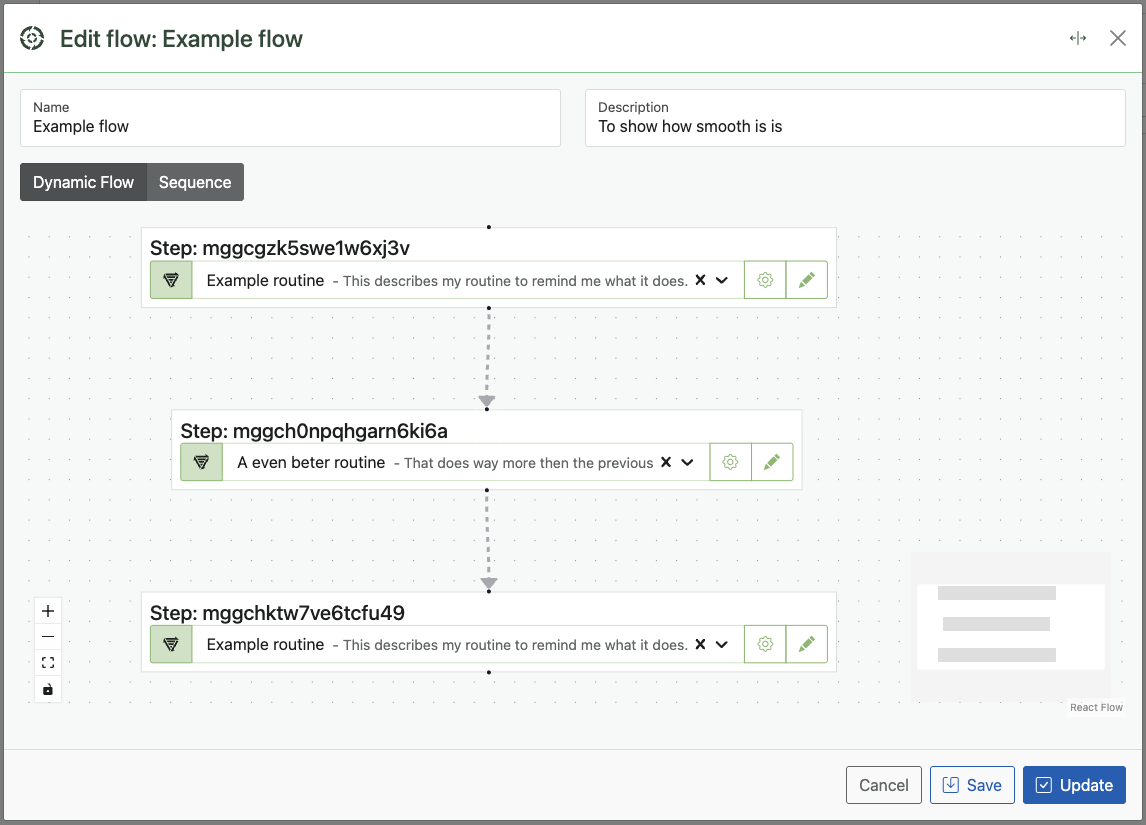
Flows execute routines in sequence by default, but we are working hard to support advanced configurations that allow you to run routines in parallel for better performance and flexibility.
Reusing Routines Across Flows
SyncEngine encourages reusability. You can use the same routine in multiple flows without duplicating configuration.
This not only saves time but ensures consistency across automations.
Example:
- Routine: Retrieve Orders — gets all new orders from your database.
- Routine: Send to ERP — pushes the orders to your ERP system.
- Both routines can be reused in different flows for various automation goals.
Flow Logic (Planned!)
Flows can include conditional logic, loops, and branching through tasks such as:
Choose– Executes specific branches based on conditions.Loop– Repeats routines or tasks over datasets.Trigger– Starts other flows independently.
These control mechanisms make flows adaptable for any process, from simple synchronization tasks to complex multi-system orchestrations.
Example Flow
Use Case: Sync product inventory between your online store and ERP system.
Flow: Sync Inventory
  ↓
  Routine: Retrieve Products
    └── Task: Retrieve (API → Shopify)
  Routine: Process Data
    ├── Task: Map (normalize structure)
    ├── Task: Filter (exclude archived)
    └── Task: Group (by SKU)
  Routine: Send to ERP
    └── Task: Send (ERP API)
In this flow: - Each routine performs a distinct part of the process. - Tasks transform and move data forward. - SyncEngine logs every action for full transparency.
Flow Configuration Options
| Setting | Description |
|---|---|
| Name | The label for your flow, visible in the dashboard. |
| Description | Optional documentation for your flow’s purpose. |
| Error Handling | Choose whether the flow stops or continues when an error occurs. |
| Logging Level | Control how detailed logs are for this flow. |
Debugging and Testing Flows
Use the Preview Function to test flows safely before activation.
You can preview any routine or task and inspect the resulting data step by step.
Tip: Use the
Tracetask inside routines to print debug information directly into the flow log.
Best Practices
- Keep flows focused, one purpose per flow.
- Reuse routines across flows to avoid duplication.
- Use clear, descriptive names for each flow and routine.
- Always test new or modified flows in Dry Run mode before going live.
Next Steps
- Routines – Learn how routines organize tasks.
- Automations – See how flows fit within the larger automation structure.
- Tasks – Explore the individual actions that make your flows work.
Note: Flows are where your automation logic comes alive. The more modular your design, the easier it becomes to maintain and scale SyncEngine as your integration ecosystem grows.